
How do I restore a Form Layout?
Sometimes you may accidentally make unwanted changes to a form layout and then decide you would like to restore a previous layout. Fortunately, ClinicOffice makes automatic backups of your form layouts whenever you change them.
Here’s what to do :-
[1] Click TOOLS | FORM DESIGNER
[2] Select the Form in question and click DESIGN
[3] Beneath the CLOSE FORM DESIGNER button, there’s a small “tag” button (please see the image below)
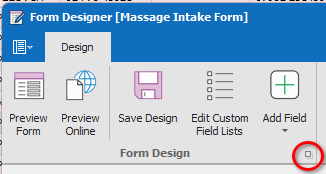
[4] Click this button and then select the layout you wish to revert back to.
The Form Designer will now close and the layout will be reverted (CAUTION – Changes will affect forms that have already been completed except for any PDF versions).
PLEASE NOTE: This operation cannot be undone which is why this feature is deliberately “obscure” so that users are unlikely to do this by accident.