
Which document/image scanner do you recommend?
When it comes to scanners, we simply recommend that you check your scanner has a good TWAIN driver.
ClinicOffice can use either TWAIN or WIA (Windows Image Acquisition) to access scanners or imaging devices attached to your computer. The TWAIN/WIA driver which comes with your printer is the method ClinicOffice uses to ‘talk’ to your scanning device.
We have tested ClinicOffice with lots of different scanners and by far the majority work perfectly. Those that struggle are usually older devices which have a poorly implemented TWAIN driver. Unfortunately, there’s nothing we can do about that from the ClinicOffice side of things.
Here’s a link to a few modern scanners that may be worth taking a look at if you’re looking to buy a new document scanner :
Changing driver from TWAIN to WIA
- You can switch modes with ClinicOffice from TWAIN and to WIA by following these instructions :
- Open a patient record
- Click on document tab
- Click Scan Docs
- You can now click on the [Switch Mode] text in the top right hand corner of the window
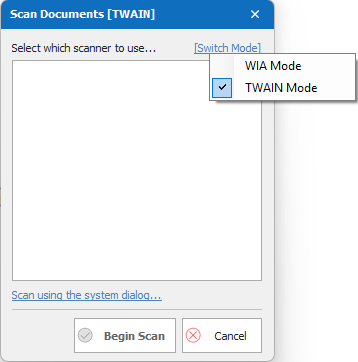
- Choose WIA mode
ClinicOffice will now only use WIA and will ignore TWAIN. If your scanner no longer appears in ClinicOffice, this means that your scanner doesn’t support WIA. You could try searching the internet to see if there’s a WIA driver you can download for your make/model of scanner, or it might be time for a new scanner!