
Pre-Pay for Appointments
If you want patients to pay for an appointment before it can be booked, then head to the ClinicOffice Web Edition Admin Settings / Financial tab and scroll to the very bottom. Make sure you have a payment method selected and you will then see the following appear…
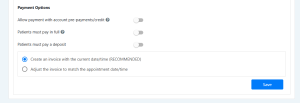
Make sure that the ‘Patients must pay in full’ or ‘Patients must pay a deposit’ option is ticked (multiple options will be available if deposit payment is selected) and then select your invoice preferences and hit SAVE. You’re all set! Patients now won’t be able book without paying up front.