Windows April 2026 Security Update
In April 2026 Microsoft introduced a security update which changes how RemoteApp connections are initiated. This is to enhance protection against ‘phishing’ and unauthorised connections. More details can be found on Microsoft’s site here.
Since our ClinicOffice Hosted Edition uses RemoteApp, you may have noticed a new connection dialog has started appearing.
What You May See
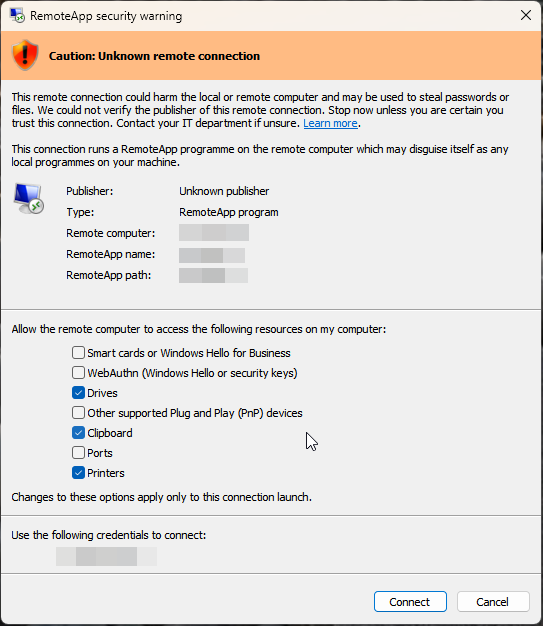
If the banner at the top of the connection window is orange and displays “Caution: Unknown remote connection”, this means you are using an older ClinicOffice RemoteApp shortcut file.
It will still work as normal, but you will need to tick the following options each time you launch:
- Drives
- Clipboard
- Printers
Recommended Update
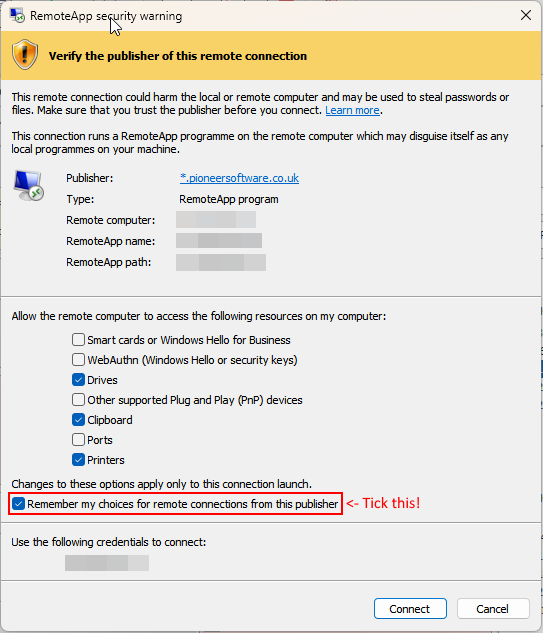
We can provide you with an updated “signed” RemoteApp connection file which offers two key improvements:
- The security prompt will display ClinicOffice as the verified publisher (peace of mind)
- Your selected options (e.g. Drives, Clipboard, Printers) can be saved, so you don’t need to select them each time