
How to use the ClinicOffice Consent Manager
To support GDPR compliance, we introduced the Consent Manager in our 1094 update. Designed to help you manage patient consent clearly and efficiently, you’ll find this feature under the Patient drop-down menu in ClinicOffice.
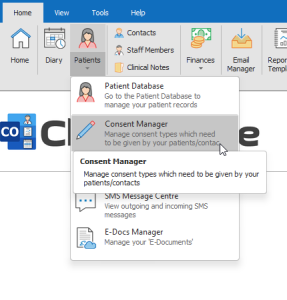
Clicking here will take you to the manager window in the picture below:
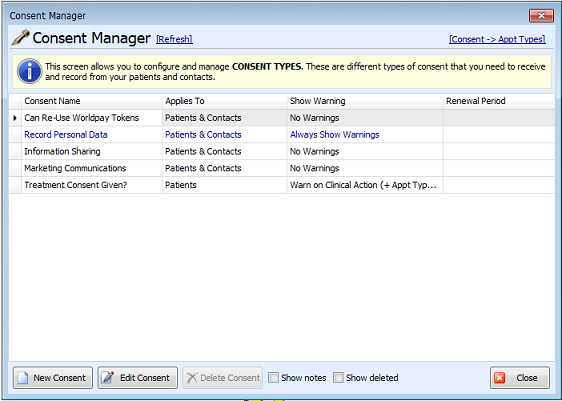
You will then notice a list of predefined consent types. From here you can create new consent types, assign certain consent types to specific appointment types (some treatments may require different consent types) using the link on the top right. You can edit a consent type by left clicking on one and click the Edit Consent button. This brings you to the following screen:
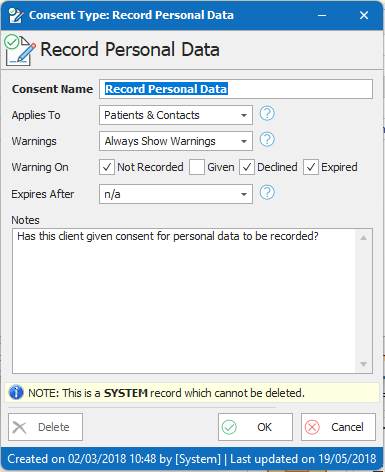
This screen allows you to adjust how the consent will be managed. Each of the drop-down menus has a help button next to it that explains its function. The expiry date function allows you to set a default amount of time after the consent was given before ClinicOffice reminds you that you need to get consent again.
If you plan on using this feature then it is important to spend time getting your consent types correct before you start using them.
Once done, below is an example of how they would function upon trying to book an appointment for a patient that has not given consent for treatment:
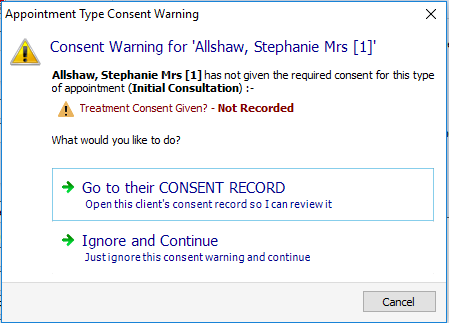
Clicking to go to the CONSENT RECORD will take you to a new ClinicOffice screen inside the patient’s record. You will notice that all of your consent types are displayed here and this includes both the consents your patient has agreed to and the ones they have not.
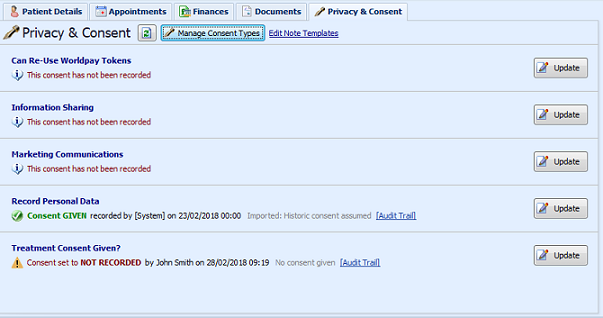
** Anytime consent is given/updated, ClinicOffice requires notes to help keep track of any changes. This is in line with GDPR requirements on recording how consent was taken. An audit trail is also kept for each consent.**
It is important to note that just using our consent manager does not necessarily make you GDPR compliant and neither can we give you advice on what you should/shouldn’t need consent for. This feature simply gives you the ability to comply in whichever ways you feel necessary.
For further information on ClinicOffice and GDPR, please see the following link: