

Forum Replies Created
-
AuthorPosts
-
It might be a bug – we’ll take a look and see if there’s something that needs fixing – thanks!
Hi – thanks for pointing that out – we’ll get it corrected in the next update. 🙂
No idea – it seems to work fine for us – please double check that your email address is correct on your forum account – thanks.
There is a view called “view_invamtalloc” which gets back how much is allocated against an invoice. For example, the following will get all the invoice fields and the amount allocated against each invoice :-
select inv.*, view_invamtalloc.*

from inv left join view_invamtalloc on (view_invamtalloc.inv_id=inv.id)You could use either the “Family Head” field or perhaps the “Responsible Party” field both of which are on the Patient Editor (on the 2nd page I believe). If you select either a Family Head or Responsibly Party then you only need to double click on the name to go to that record.
Just don’t enter any items on the invoice (so the total = 0), or if you do add items simply make the unit cost 0. You then don’t have to enter a payment as the invoice will automatically be paid in full.
OK – we’ll add that as a wish-list item and will consider it for future development. Many thanks!
It could be made to work, but will never be able to act as a default mail client as it runs on a remote computer, hence we decided to leave it out of the Hosted Edition.
*UPDATE* – The Email manager module is now available on the Hosted edition.
Hi – thanks for your post.
Please can you confirm that the built-in Windows Firewall is also disabled? Instructions can be found here :-
http://windows.microsoft.com/en-GB/windows-vista/Turn-Windows-Firewall-on-or-offPlease can you also check how many credits you have on your TextAnywhere account? You can log in to your TextAnywhere account by clicking this link :-
What happens if you try sending an SMS reminder manually? You can do this by right clicking on an appointment and then clicking SEND TEXT MESSAGE – does it send correctly or does it show an error message?
Please also look at the rule itself and notice the settings indicated below :-
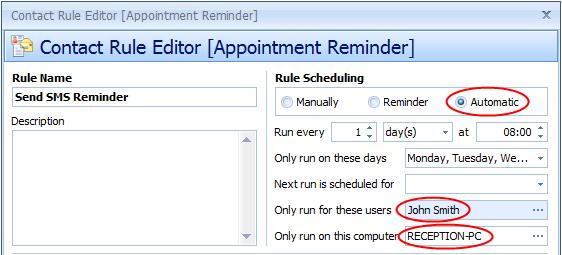
Can you please check the following :-
[1] Is the shedule still set to “Automatic” and are the times and days setup correctly?
[2] Is the rule configured to only run for a particular user and you’re now logging on as a different user?
[3] Is the rule configured to only run on a specific PC based on the computer name? If so, is it possible that the NAME of the computer has been changed?If none of the above helps, then please try running the rule manually from the above screen and let us know the results – whether it works or whether any error messages are shown.
Hi Tony,
>> Would it be possible to add the “arrivals” screen functionality to the hosted edition?
>> what is the level of development effort that would be required?This is clearly something that’s very important to you and as you’re unlikely to take no for an answer 😉 we’ve taken a look at the code to see what would be involved. The answer is that yes it is technically possible but we’d need to spend some time going through the code and make a number of changes so that it could run (a) as an unmonitored application and (b) efficiently inside a Terminal Service session.
Even with the changes, this is still really NOT recommended. The Arrivals Screen is designed to run continually and unmonitored. If your connection to the server is lost then the application will stop and will need to be manually restarted. If we take down the server for maintenance (usually done at night) then you will lose the connection and the application will need to be manually restarted.
If these scenarios don’t concern you and you would like us to provide a quote for the work involved, please contact us via email (support@pioneersoftware.co.uk) and we’ll be happy to look into it further and get back to you with a quote.
Hi – thanks for your post.
The most likely cause is that you have a firewall that is blocking ClinicOffice from accessing the internet. This typically happens after an update because the update procedure will update the ClinicOffice executable file. In turn, your firewall then sees this as a new program and starts blocking it.
Please try disabling any firewall programs you have installed, or configure them to allow ClinicOffice to have access to the internet.
Yes you’re correct – it would be best to do these as TEXT fields.
Or you could add a couple of CUSTOM FIELDS?
Hi – thanks for your post.
Have you looked at the Waiting List feature? It’s discussed on page 28 of the current version of the ClinicOffice v4 User Guide. You can click “HELP | USER GUIDE” for the PDF version on your computer.
>> is there a similar one for invoice lines and payments?
There is a “view_payments” but there’s no view for invoice lines (the “invline” table). These need to be joined to the “inv” table on “invline.inv_id=inv.id”. For example :-
select inv.*, invline.* from inv left join invline on (invline.inv_id=inv.id)>> I thought all the bespoke element was on the local PC with the Server application
>> itself was standard build? I was more expecting issues with the constant interrogation
>> for updates every few secondsWith the Hosted Edition BOTH the application AND the database are hosted on our servers. There is no local installation at all, hence there is no issue with the database interrogation. The problem lies in the fact that our Cloud Servers are configured to allow remote instances of ClinicOffice to run, rather than other bespoke applications. There are also other technical issues with regard to running a remote application which is ‘always-on’ and has no remote input (like the Arrivals application) which means that we couldn’t offer it as a remotely installed application.
(NOTE: I’ve removed the Arrivals application from the previous post as it was a paid-for bespoke application for your organisation.)
You can still raise invoices for a £0 amount – the invoice will simply show up as being “Paid” immediately. This will allow you to use the various sales reports which rely on an invoice being raised for items.
Hi Tony,
Thanks for your post. If you look at the COv4 Pricing page (click here) you will see there is a link to a document which discusses the Hosted Edition versus non-hosted and will help to answer your questions.
To answer specifically :-
[1] Please see the document referenced above
[2] No, this will not work on the Hosted Edition. We can only host ClinicOffice, not bespoke applications
[3] Upload is not particular relevant (256kbps+), download should be a minimum of 1Mbps – the higher the better for both
[4] The same as the Server EditionHope this helps!
Yes – please contact our sales team by emailing sales@pioneersoftware.co.uk or phoning our office. Thanks!
Hi – thanks for your post. We don’t publish our database schema, but if you can tell us what information you’re after then we’d happy to assist!
The ‘_’ before a column alias simply tells ClinicOffice to ignore that field when it builds the Search Criteria form.
Typically, this is used on lookup fields. For example, if you have an ‘apptype_id’ foreign key field, the Search Criteria understands what it is and will create a multi-selection editor from which you can choose “Appointment Types”. However, the same SQL will probably also have a lookup field called ‘_apptypename’ which is the lookup name of the appointment type, corresponding to ‘apptype_id’. The lookup field is a simple text field and may as well be hidden from the Search Criteria, hence the ‘_’.
Hope this makes sense!
Please download and re-install 1060 again (please make sure you do this on ALL your computers). We have removed the words “on”, “today”, “yesterday” and “tomorrow” for non-english installations of ClinicOffice.
Hi – thanks for your post.
>> Can I make any changes now without having to establish a new version of the database?
Yes you can re-design your forms in ClinicOffice and add/edit/remove custom fields at any time.>> What happens to my existing records? Will they maintain their current format (in which they were created) when recalled, or will I introduce some form of data validation errors due to the altered Custom Fields?
Bear in mind that you are re-designing that SCREEN in ClinicOffice – you are not re-designing a “record”. So when you re-design a screen layout (e.g. like the SESSION screen) then all your records (past and present) will be displayed with the current screen layout.If you choose to physically DELETE a custom field from the database, then any data historically entered into that field would also be deleted. ( ❗ The program does go to great length to warn the user about this and forces them to type ‘YES’ to confirm if that is what they want to do.)
If you want to remove a now superfluous field without deleting data that was associated with that field, then the best thing to do is to HIDE the field by dragging-and-dropping it into the Customization window which appears when you enter design mode.
>> Obviously I am a bit wary of altering the data format and corrupting my current 200+ patient records.
We STRONGLY recommend that you take a backup of your database before making large changes to form layouts and design. That way, you can always revert to your backup if need be.Hope this information is helpful!
Hi Mesologie,
Thanks for your post. Please accept our apologies – we thought that had been fixed for 1059 but for some reason the code changes weren’t implemented in the release version. We’ve fixed this issue and introduced a ‘silent’ 1060 update. That means that if you download and install the 1060 update again, the problem should be solved.
Yes it is! 🙂
As long as your webcam supports WIA or TWAIN, simply right click on the Portrait image in the Patient Editor, then click “Acquire From” and then select your webcam. It’s as easy as that!
Hi – thanks for your post.
If you’ve already entered the SQL source correctly for the report, then ClinicOffice will automatically build the Search Fields from the columns available in the resulting dataset.
If you want to add additional search fields which are NOT in the SELECT statement (and hence don’t appear in the resulting dataset), then add the following line to the Report Options :-
ForcedSearchFields=friendly_name|fld_name|data_typeFor example, if you were searching the appointment table and wanted to seach on the date range for appointments (the app.start field), but you’re not selecting the app.start field in the SQL source, then you could add this line to the options :-
ForcedSearchFields=Appt Start Date|app.start|DateTimeThis is obviously quite advanced stuff and if you’re on the Support Plan and need some assistance, please feel free to contact our Support Help Desk. If you haven’t taken out any support, we strongly recommend it!
Click here for more information on joining the ClinicOffice Support Plan.
>> it counts all appointments, even if an appointment has been cancelled
Fair comment… the report has been updated to exclude cancelled appointments. Please re-download and import it again.Thank you for the suggestion.
If you synchronize ClinicOffice -> Outlook and it OMITS all cancelled appointments, and then you do a full synchronize Outlook -> ClinicOffice, you could end up with it DELETING cancelled appointments. This would obviously be undesirable.
None-the-less we’ll take a look to consider if there’s another option.
Thanks again for your post.
Please find the requested report attached. Step-by-step instructions on how to import the report into your database can be found here :-
https://pioneersoftware.co.uk/forums/topic/how-do-i-import-a-report-file-into-my-database
Thanks for the suggested report. Please bear with us and we’ll post it on this forum asap.
Hi there – we noticed this issue too which can occur following update 1059.
To fix this, simply download and install update 1059 again on each of your computers, as the update has since been ‘tweaked’ to resolve this issue if it occurs.
You can download the update from this page :-
https://pioneersoftware.co.uk/co-updatesMany thanks and apologies for the inconvenience.
Thanks for your post.
You can right-click on the grouped columns at the top of the grid and then click EXPAND ALL or COLLAPSE ALL which will save you from having to click the +’s or -‘s.
Regarding the printing issue, click the OPTIONS button on the Print Preview screen, then click the “Behavior” tab and untick the “Expand All Groups” checkbox.
Hope this helps!
We’ve just tested this and have noticed a potential problem where the allocation data isn’t being cleared. Please download and install update 1059 again to resolve the problem.
Many thanks and apologies for the inconvenience.
>> Would a mobile phone be possible? Or an Ipad?
>> Or a WEpad? Can I testdrive the system?Any device that is capable of running Windows Remote Desktop can use the Hosted Edition. However, please note that the minimum recommended screen resolution for ClinicOffice is 1024×768.
Even though it will work on a device with a smaller screen size (e.g. an iPad) this is not recommended as you don’t get a very good user experience.
Hi – thanks for your post. Please find attached a report called “Invoices List (by day)” which does this for you. It just required a small tweak to the standard Invoice List report.
Please follow the instructions in this post on how to import reports in to your database :-
https://pioneersoftware.co.uk/forums/topic/how-do-i-import-a-report-file-into-my-database
>> That’s the white document with some green ‘ticks’, some squares and no text.
Sorry – I don’t understand what you mean. The link is to a PDF document. Page 5 (the last page) details the differences between “Purchasing” ClinicOffice and “Subscribing” to the Hosted Edition and it details the pros and cons of each option.
If you’re having difficulty viewing the document, please make sure you have an up-to-date PDF Reader installed on your computer. FOXIT is an excellent free PDF Reader and is available from here :-
http://www.foxitsoftware.com/pdf/reader/addons.phpYou might also want try right-clicking the link and selecting SAVE AS to save the document on your computer.
We use Microsoft’s RemoteApp technology (available in Windows Server 2008) to deliver ClinicOffice to your desktop (see http://en.wikipedia.org/wiki/Remote_Desktop_Services#RemoteApp).
This means that both the application and the database are hosted on our servers.
>> And here the big question: how difficult is it to make a script
The answer is that it would be incredibly difficult. Scripting primarily allows you to modify the behaviour of ClinicOffice by triggering scripts which are event-based. What you’re talking about is a bespoke import routine which is completely different and would be best handled by custom development.>> Or… do I have to wait for the online version of CO?
It would probably be better to do so to be honest. Once we get the next update released we’ll be moving ahead with development on the Online Diary.I’ve added it to the wishlist, however please note that it’s a lot of work for what amounts to a bespoke request for one customer, so it’s unlikely to be implemented unless other users request it too. If this is a requirement, please let us know and we can provide a quote for the work involved.
Many thanks.
Sometime this week.
Hi – there are currently 3 telephone fields per person :-
-
– telephone
– worktel
– mobileThese are system level fields. You could add additional CUSTOM TEXT fields to use as additional phone numbers, but as they would be CUSTOM fields rather than SYSTEM fields, there’s no way for ClinicOffice to be able to recognize them as telephone fields without making bespoke changes to the software.
If this is a necessary requirement for you, then please send an email to our development team (dev@pioneersoftware.co.uk) giving as much detail as possible about your requirements, and we’ll be able to provide a quote to undertake this work for you.
Thanks for your post. This has been fixed in build 1059.
Hi MLINOU,
>> After the step 6 the following message appears on the client PC \maria
>> “The network path was found”
I presume you mean “The network path was not found”?>> i guess my network is not setup correctly. Any suggestions?
Unfortunately there could be hundreds of reasons for this.The first thing to check that the computers are physically connected to the same Local Area Network correctly. Also make sure that you turn off the firewall and anti-virus on BOTH computers. You might also want to check that you definitely have got the computer names correct. Without being physically on-site, it’s very difficult (nigh on impossible) to diagnose network problems.
Failing the above suggestions, you really need to get a computer technician to have a look at your network. Once they get Windows File Sharing working (which is the root problem), then ClinicOffice will work fine.
OK, so on your host computer MARIA, please do the following :-
1) Open ClinicOffice v4
2) Click on Manage Databases
3) Select your database
4) Right click and select ‘Share Database’
ClinicOffice v4 will now setup your file sharing so that you can connect from other PC’s. Once it has done this it will give you the ‘unc’ path that you will need to type into the other computers. This will look something like: \MariaMy_Database
PLEASE WRITE THIS DOWN EXACTLY AS IT APPEARS.After completing the above steps, go to the client PC (NIKOS) :-
5) Click the START button, then click RUN
6) Type in the following and press ENTER \maria
7) If your network is setup correctly and if no firewalls or anti-virus programs are blocking access, then you should now see a window showing you the NETWORK SHARES on the “MARIA” computer, including your ClinicOffice database. This confirms that your network is working correctly.
Presuming it is all working, you can now follow these steps (still on the client PC – NIKOS) :-
8) Run ClinicOffice v4
9) From the Logon screen, click the “Manage Databases” then “Locate” link under the “Select which database to logon to:-” box
10) Type in the UNC path of the database – this is the path exactly as reported in STEP 4 – click OK
Your database is now configured to be shared across the network.
For more information, please refer to the original step-by-step guide here :-
https://pioneersoftware.co.uk/forums/topic/faq-102-how-do-i-share-a-database-on-my-network-cov4
Please tell us the names of each computer and please indicate which computer is the HOST (i.e. the one which holds the database) and which is the CLIENT.
To find out the NAME of a computer, right-click on the MY COMPUTER icon and click Properties. On Windows XP you then need to click the COMPUTER NAME tab which tells you the name of the computer.
Once you tell us the names of your computers, we’ll give you some step-by-step instructions.
Hi Roelof – this issue is caused by HTML encoding for non standard characters. We’re going to be re-writing the Patient Info screen at some point soon and will fix the issue then.
Hi Roelof,
The question is: what size are the documents/images that you’ll be storing with the patients? We can’t answer that for you. If you’re going to be storing approximately 0.5Mb of compressed document(s) with each patient and you have 15,000 patients then that = 7.5Gb.
I’m afraid that we can’t answer this as only you know what data you will be storing. However, the biggest database that we have come across is about 5Gb.
Hope this helps.
>> Are there any issues with CO and VSS (volume shadow copy) based backups?
No, there are no known issues.>> Would it help if I excluded the COv4 data directories from Mozy temporarily?
Yes it might be an idea to try that.>> Also, what happens if CO is run in the morning and is still open when Mozy does a VSS based
>> backup at night
That’s really a question for your backup company and how it handles files that are in use.The error in the ClinicOffice screenshot that you posted indicates that the database files are in use and locked at the time when ClinicOffice is trying to work on them. We’d recommend disabling any applications (continuous backups/anti-virus etc.) which may be locking the files to see if you can discern which program is causing the problem.
Thanks for sending your database. We have restored it on a test machine, we have logged on, tested the core features, logged off, taken a backup, restored the new backup and re-tested the restored database and we cannot find any problem at all.
If this problem persists, then most likely it is an issue with the installation of ClinicOffice on your computer. Please completely uninstall ClinicOffice then download the full installation again from here :-
pioneersoftware.co.uk/files/cov4/cov4_setup.exeFrom your description, it sounds like you were doing this the correct way i.e. by creating a discounted version of the same item for billing purposes, entering a pre-payment and then raising an invoice on each visit. This is the most accurate way of recording the transactions as it accurately reflects what is happening from the ‘financial’ point of view.
To remind your staff of patients who have pre-paid (and hence require a discounted item), you can add an ALERT FLAG. This will inform you that they are on a certain pre-pay scheme and that they qualify for a discount. Once the last invoice has been paid and the patient’s balance is £0, simply remove the flag by clicking the DELETE button on it.
If you have any suggestions as to how this could be made easier without complicating matters further and without the need to make massive changes to the financial workings of ClinicOffice (which would upset a lot of happy customers), then we’re always happy to consider suggestions.
-
AuthorPosts
