

Forum Replies Created
-
AuthorPosts
-
Hi Mark – thanks for your post.
Click the VIEW tab at the top of ClinicOffice and then click CHANGE MY PASSWORD.
This allows you to set a new password.
Hi – thanks for your post.
That message simply means that you’re entering an incorrect username – in other words the username you are entering does not exist in the restored database. Please bear in mind that if you’re restoring from quite an old backup then it might be possible that your username used to be different in the past.
Here’s an FAQ which may also help you :-
https://pioneersoftware.co.uk/forums/topic/faq-328-what-can-i-do-if-i-forget-my-username-password?view=all
Hi Roelof – this should be fixed in update 1081 – please let us know if it’s still an issue on your computer.
Thanks for the additional suggestion 🙂
Hi Charlotte – apologies for the delay in replying. I don’t think they current charting engine allows you to group the appointment types into groups, however we are working on a major upgrade to the reporting/charting engine for ClinicOffice v6 so I’ve added that request in to be implemented for the v6 release.
Many thanks.
Hi Roelof,
You can achieve this by creating a REPORT HEADER which only appears on the first page of a report. Next, select the PAGE HEADER band and in the “Property Grid” locate the “Print On” property and set this to “not with Report Header”.
The result will be that the REPORT HEADER band will appear on page 1 and the PAGE HEADER band will appear on subsequent pages.
Hope this helps!
Hi Eniola – we’ve investigated this further and I’m afraid it’s not possible to use the “reply to mobile” feature from outside the UK. The best alternative would be to use the “reply to email” option which will allow your customers to reply from their mobile phones, then the message will be converted to an email and sent to the adress that you specify.
When you say “it didn’t work out”, please can you be more specific? What exactly happens? Is there an error message, if so what does it say? Please give us as many details as possible so that we can continue to help you.
Hi – thanks for your enquiry. At present, I’m afraid that we do not have a facility to do a complete merge of two databases.
It is possible to do a partial export / import though. For example, if you have a “main” database which has the majority of your patients, appointments, finances etc. and a “secondary” database which has a smaller number, then you could export the patient list (i.e. patient names, addresses and contact details) from the secondary database and import that data into your main database. You could then do a similar export / import of the appointment diary too.
Q. Why don’t we have the facility to do a complete merge of two databases?
ClinicOffice uses a “relational database structure” which is incredibly complex. Writing a utility to merge two relational databases containing both disparate and overlapping data would be A MASSIVE undertaking.Q. Why is writing a database merge utility so difficult?
Every record in a database has a unique indentifier (an 'ID' field) and each record may reference dozens of other records. When merging two databases you cannot simply aggregate the two datasets. Firstly that would result in conflicting unique ID fields and secondly some records need to be merged rather than aggregated.For example you may have an Appointment Type called “Consultation (id: 1)” in database 1 and an Appointment Type called “Initial Consult (id: 5)” in database 2. They are of course the same appointment type and should be merged. However, they have different ID fields. There will be thousands of other entities referencing AppType:1 in database 1 and thousands referencing AppType:5 in database 2, all of which need to be somehow reconciled in a merged dataset.
That's a simple example. What about overlapping patient records? How do you determine if a patient is the same person? The spelling of their name? What if their name is mispelled in one database, or hyphenated differently? Then the records get incorrectly aggregated rather than merged. What if you have 3 “John Smiths” in one database and 2 in the other? Which ones match up? Perhaps compare their DOB or Postcode, but what if that data not been entered into both databases or has been entered differently? From a computer's point of view it's incredibly difficult to know when overlapping records should be merged and when they should be separated.
Even once you've worked that out, you still need to fix every single reference to each merged entity. Here is a list of the database entity IDs that a single patient record links to :-
patient -> app.per_id, patient -> appwait.per_id, patient -> cas.per_id, patient -> doc.per_id,
patient -> fileatt.per_id, patient -> custom_patient_fields.per_id, patient -> img.per_id,
patient -> inv.per_id, patient -> inv.patient_per_id, patient -> alloc.per_id,
patient -> item.supplier_per_id, patient -> link.ref_per_id, patient -> link.ref_cn_per_id,
patient -> pay.per_id, patient -> per.refby_per_id, patient -> per.gp_per_id,
patient -> per.resp_per_id, patient -> per.insurance_per_id, patient -> per.invrecip_per_id,
patient -> per.familyhead_per_id, patient -> po.supplier_per_id, patient -> sess.per_id,
patient -> staff.per_id, patient -> visnote.per_id, patient -> credit.per_id,
patient -> pclog.per_id, patient -> custom_session_fields.per_id, patient -> custom_case_fields.per_id,
patient -> perpasswd.per_id, patient -> recall.per_id, patient -> custom_contact_fields.per_id,
patient -> company.primary_per_id, patient -> actlog.per_id, patient -> ticket.per_id,
patient -> charge.patient_per_id, patient -> charge.invto_per_id, patient -> auxper.master_per_id,
patient -> cardsave.per_id…and that's just a patient record. Merging financial records is even more complex.[/spoiler:27wgri7f]
Q. Are you planning to write a utility to merge databases?
As a small company, we obviously have limited resources and our development time is focused on developing ClinicOffice and undertaking bespoke (paid for) development work. The time and cost to design, code and maintain a database merge utility (which is essentially a one-shot utility that a customer would only use once) would be incredibly high.So… what we’re asking is that if this is an absolute requirement for you (and if a simple export/import is not adequate) then please contact us to let us know. If there is sufficient interest and we can raise sufficient funding to at least cover the costs then we’ll be happy to schedule in the development.
Hi Charlotte – under the Chart Properties please go to “SeriesTemplate” and then set “LabelsVisibility” to true.
Hi Charlotte,
Please click VIEW | TYPES AND CATEGORIES, then go to Appointment Types. At the top of that screen tick the box that says “Show Appointment Type Groups”. You can also click the “Edit Groups…” link to group together common appointment types.
Please let us know if that helps? Many thanks.
>> Yes I have been able to export the gris and chart – but it is the inbetween data
I’m sorry – I don’t understand what “inbetween data” is.Do you mean how to show the actual values on the charts? If so, it depends on what type of chart you are using. For example, if you’re using a LINE chart, under the CHART PROPERTIES, go to “SeriesTemplate” then set “LabelsVisibility” to TRUE. This will show the plotted values on the chart.
>> we have in finance serves and times how to show all of them on invoice like if the customer bay one or two times
I’m afraid I still don’t fully understand – do you mean “how can you add multiple items to an invoice”? If so, simply click the little PLUS button at the bottom of the list of items on the invoice. Alternatively you can right click on the invoice lines and click NEW LINE.Have you worked through the TUTORIAL yet (it’s available from the HELP menu)? That will show you how to create invoices.
>> if i give discount for one item like 20% discount how to show all of these on invoice
Do you mean “how can you give a discount to a patient for ALL their invoices”? If so, please see the discount field on the PATIENT’s record (not the invoice record). This allows you to set the default discount for all invoices for that patient.Hi Charlotte,
If you right-click on a chart and click DESIGN, you can see all the available options on that screen. There are lots of options under the “Chart Properties” header which relate to the chart, including the lables.
The charting tool is licensed from a 3rd party company (Developer Express) and in the I’m not sure if it’s possible to always show all the label values on all chart types and you didn’t mention which chart type you are using. However, you will find that under the list of “Chart Properties” there are a number of settings you can change which affect the “labels” on a chart. Please look through all the settinsg in the “Chart Properties” list to see if you can find anything there which suits your needs.
Hi Charlotte,
You can export a chart by right clicking on the chart image in ClinicOffice and choosing the EXPORT option. If you’re referring to exporting the underlying chart data, then it’s simply a matter of exporting the GRID on which the chart is based, in which case you need to right-click on the GRID and select the EXPORT option.
Please let us know if this helps to answer your question.
Hi – thanks for your post. I’m afraid however that we’re struggling to understand the problem you are reporting. It’s not possible for an invoice to be “date-less” as the date field is mandatory on invoices.
Please can you explain in more detail exactly what problem you are experiencing and how we can help you? Many thanks.
Thanks for your post Ronan.
There are literally 100s of VOIP systems and we’ve already had feedback from dozens of customers who use dozens of different VOIP providers. It would simply be impossible to develop and maintain integration with all of them due to the amount of work involved – especially as each VOIP company seems to use their own differing APIs.
There also has to be a business case for us to invest our time and money into developing a feature. If there were a reasonably large number of customers all requesting integration with “Samsung XChange” then we would certainly consider it, however I’m afraid that the only feasible way we could expend days/weeks of work developing a feature which only one customer has asked for (and stay in business ourselves) is to offer to quote for the work involved.
I hope this makes sense!
Hi – thanks for your post.
>> I would be very interested to know if Clinic Office will be able to integrate with this also for call pop-ups, dialling etc?
The answer is yes we could make ClinicOffice integrate with the Samsung Xchange system… the problem is that it’s not a five minute job, but would rather be days or weeks worth of work for us to design/develop/test/document such an integration.If you would like to receive a quote for us to develop this integration for you, then please drop an email to “sales@pioneersoftware.co.uk” and one of our sales team will be happy to arrange that for you, but please be aware that based on the amount of work involved, the cost would be significant.
Many thanks.
>> The button at the end of the ’email-adres’ in de patient editor stopped working after
>> the last update (in fact, it opens up tens of internet explorer windows)It sounds like you have registered something else (probably IE) as your default email handler instead of ClinicOffice, hence email addresses are being sent there instead of being handled by ClinicOffice. Please make sure that ClinicOffice is registered as your default email handler in your Windows Control Panel.
>> Since a while I have no TopBar at my email-window
You’re correct – another customer showed us that recently and we’re working on a fix. In the meantime, you can workaround it by choosing to NOT to show the Email Manager in its own window (under the Email Settings panel).
Many thanks!
Hi – thanks for sending that error message. Apparently our SMS provider’s gateway only supports standard ANSI characters, which means arabic text messages are not going to be possible – sorry! 🙁
Thanks for the suggestion. It’s already on our wish-list to add documents and sms messages in the Contact Journal. 🙂
Thanks for your suggestion – we’ve added it to the wish-list. 🙂
Hi – there are no additional “Unicode” configuration options for the TextAnywhere service. If you’re able to type in Unicode characters on the screen and click the SEND SMS button, then whatever you have typed in should be sent to the SMS gateway.
I’m pleased to report that we managed to introduce a scrollbar on the Visual Notes in build 1080 – please update to this latest build if you haven’t done so already – many thanks!
Hi – thanks for posting.
We’ve just been trying to reproduce this problem but without success. We selected over 100 emails each time, but whenever we click “Mark as Read” or “Mark as Unread” it always affects all selected emails.
Do you have any other steps we can try to reproduce this problem? Many thanks.
Hi Roelof,
The conversion routine checks to see whether the resulting images are smaller than the PDF file. If there’s no benefit (or indeed if the image files are actually bigger which could happen if your PDF is already well compressed) then it will simply store the original PDF file.
To test this, please try adding a BIG PDF file (with lots of embedded images) and it will become apparent that the feature is working.
What didn’t change sorry? Did you go to Program Settings and tick the box that says “When sending emails use the mailto: command”?
I notice that you have a Support Plan with us, so if you’re still struggling please can you give our help desk a call and one of our technicians will be happy to connect in remotely to assist you – many thanks!
Hi Roelof – we’ve just released a silent update to 1080 which should resolve this issue. Please can you re-download and re-install the 1080 update and let us know if it fixes it for you.
https://pioneersoftware.co.uk/co-updatesMany thanks.
Hi Roelof – please can you re-download and re-install the 1080 update again. We’ve made some modifications that should resolve the telephone formatting issue for customers in The Netherlands.
https://pioneersoftware.co.uk/co-updatesPlease let us know how you get on – thanks.
Hi – thanks for your post.
That’s the second request for “Gradwell” integration so we’ve looked into it further. Gradwell do offer an API but unfortunately it’s quite limited and not nearly as comprehensive as Birchill’s API. This means that the only feature we can integrate is “click-to-dial” – call notification popups aren’t possible with Gradwell which is a shame as that (in our opinion) is the best bit about VOIP integration!
We’ll see if we can add in “click-to-dial” integration with Gradwell for the next update – many thanks.
Thanks for pointing that out Roelof. We didn’t realise that the Netherlands needed to remove a leading ‘0’ character when formatting international telephone numbers.
We’ll add this in as an option and release an update for you soon.
OK – we’ll take a look at it in the code and release a patch if necessary – thanks!
Hi Roelof – this feature should work even better with the Email Module.
Please can you try the following – go to VIEW | PROGRAM SETTINGS and on the “Local Computer Settings” tab, click “Set the default email client type on this computer”. Now select the “Force MAILTO” option.
By default, the reporting engine uses MAPI to send emails which may cause an issue if you have a different email client installed which is registered as the MAPI handler. Setting this option makes ClinicOffice use “mailto:” commands instead of MAPI.
Please let us know if that helps at all.
Hi Nick – thanks for your post.
>> one patient received the sms reminder at 3am
>> multiple sms reminders about the same appointment sent
>> erroneous reminders about false appointments again sent repeatedly to patientsSorry to hear that you’re having difficulties with the SMS texting. Please be assured that we have 100s of customers sending 1000s of SMS text messages every day, so we tend to find that on the rare occasion when issues like this occur, it’s due to an incorrect configuration of an SMS rule.
Please can you post a screenshot showing us your Appointment Reminder rule? Here’s a typical SMS rule with some pointers as to what settings to check :-
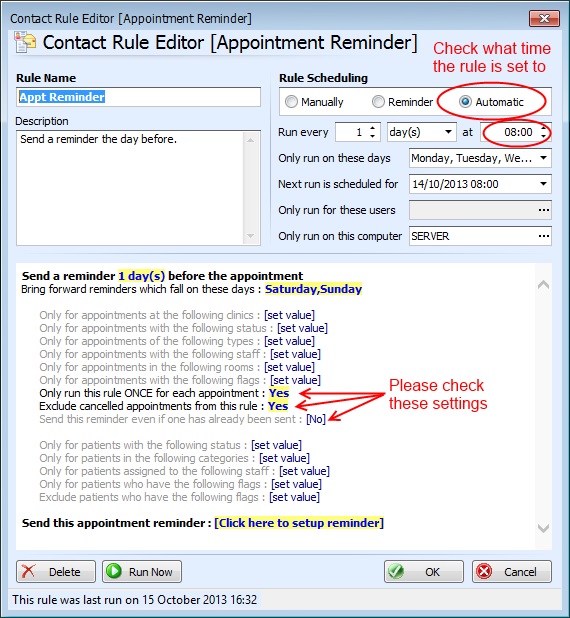
If you can please post a screenshot of your SMS rule, that will help us to diagnose the problem.
>> I have done that already
As previously explained, that screenshot shows you trying to register your account again – it doesn’t show the settings at all. Please follow the instructions in our previous post to get to the SMS Configuration screen.This means there is a configuration problem with your SMS account. Please check the settings by going to VIEW | PROGRAM SETTINGS | GLOBAL SETTINGS | Setup SMS Account.
This brings up the “TextAnywhere Setup” screen. Click “Page 2 (Configuration)” and check all the settings. If you feel they are all correct and you can’t see a problem, please provide a screenshot of that screen for us to see.
OK – but on the screenshot you were trying to re-register your account which will obviously fail if it’s already registered.
What happens when you try to send a text message? Please can you give us a FULL description including the exact error message you’re seeing.
Hi – thanks for your post. The screenshot is showing the “Register TextAnywhere Account” screen which is the screen you should use when you first create a TextAnywhere account.
You said “my service had been working fine before my last update build i.e 1080” – please can you help us to understand why you’re trying to register your account again if it was already working before?
Hi – thanks for your post.
Sometimes this means that you have ticked the “Use SSL” option for a server which doesn’t support SSL, or (conversely) that you haven’t ticked “Use SSL” and the server only supports SSL.
Please can you try changing this setting. You could also try port 465 as well as port 25 with both the SSL box ticked and unticked to see one of those combinations works.
Please let us know how you get on with the above suggestions.
Hi Roelof – I can confirm that this feature is in update 1080 which will be released shortly – many thanks!
Thanks for your post. I’m not sure what version of ClinicOffice you’re using but in the latest version, it pulls in all populated data to give you a complete summary. Any fields that are not populated are omitted so there’s no wasted space.
There’s also a “Send to WP” button which exports the summary to an RTF file and opens it as a document. This allows you to edit the summary and remove any superfluous fields before sending it on somewhere else.
I hope this helps!
Hi Richard – thanks for contacting us.
>> I’m having problems on the two other PC’s using CO with CO freezing and delays in the software
>> responding. If I write a message for example the text goes in the message box then it freezes
>> momentarily before I can continue writing the message.
The fact that it’s occurring on the two networked PCs and not on the main PC does seem to indicate that it’s most likely a network issue. This may not be due to a slow network per se – it could be that you have virus scanners on your computers which are scanning network traffic, or it could also be that you haven’t excluded the ClinicOffice database folder from your virus scanner.Please see theses posts for more information :-
https://pioneersoftware.co.uk/forums/topic/faq-402-which-antivirus-program-do-you-recommend-updated?view=all
https://pioneersoftware.co.uk/forums/topic/faq-407-how-to-exclude-clinicoffice-from-antivirus-software?view=all
Additionally, there is a post here which contains some other helpful performance tips :-
https://pioneersoftware.co.uk/forums/topic/faq-401-how-to-improve-the-performance-of-clinicoffice?view=all
Please also make sure that all your computers meet the recommended specifications here :-
https://pioneersoftware.co.uk/co-specs
>> This is the gigabit switch I use and it says it ‘autosenses’ upto 1000mbit, it’s a wired network;
That network setup sounds fine, although please bear in mind that even if your switch supports 1GB networking, if your PC network cards are only running at 100MBit, then the whole network will downgrade to that speed.You could try running a LAN speed test to see what the actual throughput is on your network. There’s a free tool called “LAN Speed Test” (http://www.totusoft.com) and here’s a direct download to a free LITE version (it’s an .EXE file which you can run immediately after download without any need for installation) :-
http://www.totusoft.com/files/LAN_SpeedTest.exeI just ran the utility on my PC over our network (we have a Gigabit network) using a 1GB file (1024MB). Here are the results for you to compare with your own results :-
Test File: s:tempNW_SpeedTest.dat
Write Time = 9.6031182 Seconds
Write Speed = 853.0562480 Mbps
Read Time = 9.1458049 Seconds
Read Speed = 895.7112160 Mbps
>> What else would I need to consider regarding the network setup?
Just make sure that you configure all virus checkers to (a) exclude ALL network traffice and (b) exclude your ClinicOffice database folder. Also do the same with any malware or firewall software you have installed.
>> Can you confirm that this shouldn’t be an issue with running the Professional Edition versus
>> running the Server Edition of CO?
There’s no reason why you shouldn’t be able to get acceptable performance from networking the Professional Edition with up to 5 computers. We have 100s of clinics who do this without any performance issues. The Server Edition uses the PostgreSQL database engine which is a full Client/Server database engine and is incredibly fast. It also doesn’t use Windows File Sharing at all. There’s no doubt you would see a significant performance boost if you were to upgrade.>> Do I have access to CO updates?
To update ClinicOffice, click TOOLS | CHECK FOR UPDATES.Hopefully the above will help to troubleshoot your performance issues.
Thanks for your post. To be honest, this issue has only ever been mentioned by yourself so it’s presumably not a problem for most users. The drawing component used does not allow us to zoom in and out while editing the image, however we’ve just noticed that since we last looked into this, our component provider HAS added the ability to make it scrollable, so we will implement that in the next update (1080).
In the meantime, one suggestion might be to collapse the ribbon bar at the top of the screen which you can do by right-clicking and clicking “Minimize”. This will increase the vertical space available for you which may help.
Many thanks.
It sounds like you want to report on the Appointments (rather than the Patients). Please go to the Diary and then click “Switch to Grid View” (top right).
You can then search for appointments based on the “Appointment Type” field over a period of time which shows you what kind of treatments were performed and who the patients were.
Please let us know if that helps at all?
Please go back to the instructions here : https://pioneersoftware.co.uk/forums/topic/how-do-i-import-a-report-file-into-my-database
…and download the ClinicOffice v5 templates that you require (not the v4 templates).
This is most likely related to the physical corruption issues that you recently experienced on your computer. It means that a report template file has become corrupted.
You need to RE-IMPORT “Customer Statement” report template by following the instructions in this post :-
https://pioneersoftware.co.uk/forums/topic/how-do-i-import-a-report-file-into-my-database?view=all
Hi Tony – thanks for your post.
>> 1) Select particular staff based on their staff.knownas data field
In your SQL source you starting with a “select staff.id”. In the datatable, this will result in a field called “id”, however ClinicOffice has no idea what a field called “id” refers to. If you change the start of the SQL to :-select staff.id, staff.id as staff_id, app.apptype_id...This will enable ClinicOffice to search on the STAFF member.
>> 2) To have the option to include deleted staff on the selection list
This will automatically be the case once you have made the above change, but you need to remove the “(staff.deleted<>true)” clause from your WHERE statement in the SQL.>> 3) Select by apptype_id
It will already offer this based on your SQL.>> 4) Select by appointment status
Add the following fields to your SQL :-app.appstatus_id, appstatus.name as _appstatus,Hope this helps!
That’s a good question!
As far as the physical field type in the database, NUMERIC is the correct one which we use for currency values in ClinicOffice. However, there are many other “decimal” values in the database which are also defined as NUMERIC fields – so the question is, how does ClinicOffice know whether a NUMERIC field should be a currency or not?
The answer lies in the physical field name. Here’s the internal code in ClinicOffice which determines whether a field is considered to be a currency value :-
bool is_currency =
(FieldName.Contains("cost") || FieldName.Contains("price") ||
FieldName.Contains("total") || FieldName.Contains("amount") ||
FieldName.Contains("amt") || FieldName.Contains("purchase") ||
FieldName.Contains("tax") || FieldName.Contains("net") ||
FieldName.Contains("gross") || FieldName.Contains("profit") ||
FieldName.Contains("balance") || FieldName.Contains("outstanding"));As you can see from the above, if the field name contains one of those keywords, then it’s considered to be a currency value and hence formatted accordingly.
We hope this helps to answer your question. Please let us know if we can help any further.
In addition to those strange “PHYSIOMEDICAREL2476113020342COv4_DB2900.xxx” (which appear to have been randomly created and are corrupting your backup files), your “emaillog” table header file had been deleted and hence the table data is unrecoverable.
Fortunately the “emaillog” table is not important and is just a logging table.
To fix this, you must firstly run ClinicOffice with the “/noemail” command line switch by doing the following :-
- [1] Close down ClinicOffice v5
[2] RIGHT-click on the ClinicOffice v5 icon on your desktop (the one which you usually use to launch the program)
[3] Click Properties
[4] Click in the TARGET box, move the cursor to the end of the text that is already in there, then add a space and then /lowgraphics. For example :-“C:Program FilesPioneer SoftwareClinicOffice v5ClinicOfficeV5.exe”
becomes :-
“C:Program FilesPioneer SoftwareClinicOffice v5ClinicOfficeV5.exe” /noemail[5] Click OK
[6] Launch ClinicOffice v5 as usual (by double-clicking the icon)ClinicOffice will now run but will not check emails immediately. This is necessary otherwise an error will be thrown as soon as emails are checked.
You now need to logon to your database and click TOOLS | ADVANCED DB OPERATION. Now copy and paste the following code :-
DROP TABLE emaillog;

CREATE TABLE emaillog (

id bigint NOT NULL,

datetime timestamp NOT NULL,

username varchar(250),

computername varchar(250),

account varchar(250),

logtype varchar(10),

logtext varchar(250),

logcomment clob,

PRIMARY KEY(id)

);

CREATE INDEX idxemaillog_datetime ON emaillog (datetime);
…and click EXECUTE.
This should resolve the problem by dropping and re-creating the “emaillog” table files.
IMPORTANT NOTE: You need to run a full virus check on your computer AND a full disk scan. It is very odd that you have seemingly random file corruption occurring on your hard disk and that it took several attempts to upload a 7zip file which wasn’t corrupted in some way. This would tend to point to either a virus or some physical corruption problem on your hard disk.
Hi Eniola – I’m afraid that this file is also corrupt and can’t be opened.
Please try the following. Using Windows Explorer browse to the folder which contains your database. Notice that you have SIX files called something like :-
PHYSIOMEDICAREL2476113020342COv4_DB2900.xxxDo you know what these files are? They are not part of your ClinicOffice database and it appears that these files are corrupt and are possibly cuasing the corruptiong the backup archives. Either delete these SIX files or move them to a different folder, then perform another BACKUP operation and upload the backup file.
-
AuthorPosts
