

Forum Replies Created
-
AuthorPosts
-
I’m afraid that’s not possible at the moment – I’ll add it to the wishlist for you though.
You can press CTRL-N on the diary to create a new appointment and then on the appointment editor, if you tap the ALT key you will see which letters correspond to which short-cut functions – e.g. ALT-S = Save etc.
Not as standard – most customers use “registration date” as the date that a patient joined the clinic. If you need us to add the first appointment date to a report then please contact our help desk and we’ll take a look at what you’re trying to achive and see if we can help.
Hi – thanks for your enquiry.
Yes it is possible to check a field in the session editor, but not at the point of logging off – which I don’t really understand anyway. If you have 10,000 session notes in your database belonging to 1,000 different patients, which session note is it checking when you log off?!
Hi Steve – no we don’t have any templates precisely for the reason that you mention i.e. all our clients seem to use them differently and require different information to be extracted from their Clinical Notes. Also, as soon as you enter custom fields, the report will have to be bespoke based on the custom fields that you enter.
The best course is to continue adding your custom fields as you have been doing, and then when you’ve finished, create a mock-up of the report or template that you want ClinicOffice to generate and contact our support team. We’ll be happy to provide a quote and do the work for you.
>> There is no option in COV5 to
>> “Now untick the box which says Automatically check for updates on startup”
>> Can you please help??If you click VIEW then ClinicOffice Settings, on the first screen (“Local Computer Settings”) there is a tick box called :-
“Automatically check for program updates”Simply untick this box.
Thanks for your enquiry. Please try the attached report to see if it gives you the information you require.
For a step-by-step guide on how to import a report, please see this FAQ :-
https://pioneersoftware.co.uk/forums/topic/how-do-i-import-a-report-file-into-my-database
Many thanks!
*** NOTE ***
This post has now been written up in an FAQ article here :-
https://pioneersoftware.co.uk/forums/topic/faq-303-customising-appointment-captions-in-the-diary
Hi – thanks for your enquiry. Yes it is possible to customise the auto-description, however it requires a fair amount of technical expertise to do this.
Firstly, please follow these instructions :-
-
- – Go to the diary and click the
DIARY OPTIONS
-
- button (top right)
-
- – Click the “Visual Settings” tab
- – Notice there are 2 caption formats – one for “staff view”, one for “room view” – these are the boxes you will be editing
For sake of argument, let’s say that we’ve created a custom field in the patient editor called “my_custom_field” which we want to include in the appointment caption.
The default caption format is as follows :-
{patient} [{type}] in {room}
This displays the patient’s name, then the type of appointment, then the room e.g.
Bloggs, Joe [Consultation] in Room 1
To add our custom field, we need to add the following code to the caption format :-
{custom_patient_fields!my_custom_field!per_id=@per_id}Hence the final caption format would be something like :-
{patient} [{type}] in {room} - {custom_patient_fields!my_custom_field!per_id=@per_id}
This would result in :-
Bloggs, Joe [Consultation] in Room 1 - some custom infoConstructing Custom Merge Field Codes
‘Merge field’ codes are all enclosed in curly braces i.e. {…} For custom merge field codes, THREE parts are required inside the braces :-
[1] The database table name
[2] The field which is displayed
[3] Mapping information for mapping the information to this appointmentEach of the above is separated by an exclamation mark character i.e. “!”. Let’s look at the earlier example again which was :-
{custom_patient_fields!my_custom_field!per_id=@per_id}[1] The database table = “custom_patient_fields”
[2] The field name = “my_custom_field”
[3] The “per_id” field in the “custom_patient_fields” table is mapped to @per_id which is the per_id of the appointmentA Note About Performance
Including additional custom fields in the auto-generated captions WILL affect performance because ClinicOffice will have to perform an additional database lookup for every appointment that is displayed in the diary.
If you’re a non-technical, then this is obviously going to be quite difficult to follow so please feel free to post a reply with more information about what you’re trying to achieve and we’ll be happy to help!
February 12, 2013 at 10:07 am in reply to: Some great computers to maximize your CO-experience #33108Thanks for the information Roelof – much appreciated! 😀
Thank you for the suggestion – we’ve added it to the wishlist.
Hi Roelof,
Thanks for your feedback. ClinicOffice doesn’t offer amy native handwriting recognition so presumably you’re using some 3rd party software or perhaps windows itself to enter data with your stylus?
I’m afraid that there’s nothing we can do about the performance of other applications over which we have no control! If you’re experiencing performance issues with the hand writing recognition, I would recommend asking the provider of the recognition software to see if they have any suggestions.
Many thanks!
Hi thanks for your enquiry.
If you have a look on page 154 of your ClinicOffice User Guide (which you can view anytime by clicking HELP | USER GUIDE), you’ll notice that this setting is on the GLOBAL SETTINGS page of the “ClinicOffice Settings” screen.
[1] Click VIEW | CLINICOFFICE SETTINGS
[2] Click the GLOBAL SETTINGS page
[3] Set the “backup reminder” prompt to every “1” dayThis will remind you to backup daily.
Hi Jose,
This is possibly due to a recent fix to the SSL implementation in ClinicOffice. Please check whether you have SSL selected in the “Email Account Manager” screen and try changing it to see if that helps.
Many thanks!
Thanks Roelof – we have considered this suggestion, but the problem is that some clinics have multiple staff logging on under the same username – in which case the message still needs to be sent as it still needs to be picked up by other users.
We would suggest making sure the optional message “Ask about sending appointment status messages” is switched on (in the “ClinicOffice Settings” | “User Settings” screen) and then when it asks about send the message to yourself, simply click NO.
We’re working hard on it at the moment and are nearly done.
In fact, the incompatibilities were more to do with the ClinicOffice installer rather than the program itself, so we will release a silent update to build 1075 by the end of today which should work perfectly with Windows 8.
Please download the FULL setup file from our website (https://pioneersoftware.co.uk/co-updates) either this evening or tomorrow and you should be fine.
Hi Roelof,
You can use a 3rd party application to “print” a document as a PDF document. This doesn’t actually print anything physical, but it creates the document as a PDF file. We use PrimoPDF which is free, fast and simple.
There are many others too :-
http://www.google.co.uk/search?q=free+pdf+printer+driverHope this helps!
Hi Roelof – thanks for your suggestion, I’ve moved the post to the WISHLIST forum. Many thanks!
July 31, 2012 at 11:05 am in reply to: Changes to layout appointment not permanently saved (1072) #33054Hi there – thanks for spotting this – you are absolutely correct – the Appointment Editor layout was supposed to be reset once with the latest update, but it is being reset each time you logon.
This has been fixed and a ‘silent’ update issued – please re-download and install the latest 1072 update from our website :-
https://pioneersoftware.co.uk/co-updatesHi Jon,
Sorry that you’ve experienced a problem since updating. We monitor our emails outside of office hours to assist with any emergency problems and we replied to your email last night at 10:45pm.
Please can you check your email as it contains your private registration details and answers all your questions.
Regarding the issue of computer IDs changing, this is something we have seen a few times over the last few months. To generate a computer ID, ClinicOffice simply asks your computer (via the MS .NET Framework) for its Hard Disk serial number and MAC ID and performs a hash on the two results. This has worked perfectly for years and our code has not changed. We recently moved ClinicOffice to version 4 of the framework (following Microsoft’s suggestion) and it seems that either that move, or a subsequent MS update to the framework has caused this issue for a tiny minority of computers.
Unfortunately it’s not something we can easily resolve, however customers will be aware that there is now a link on our website where you can manage your own license(s). This allows you to easily reset a license in the event that you need to move it to another computer but it can also be used to resolve this issue in the unlikely event that your computer is affected.
July 17, 2012 at 11:06 am in reply to: ClinicOffice Server Edition asking for Activation Key? #33052[Issue Update]
We received an email from the customer to say that the above post resolved the issue. 🙂July 13, 2012 at 12:11 pm in reply to: ClinicOffice Server Edition asking for Activation Key? #33051Hi Helen,
Please can you check the following :-
[1] I notice from your records that you purchased ClinicOffice v4. Is it possible that you have accidentally downloaded ClinicOffice v5 onto your computer instead? If so, please uninstall ClinicOffice v5 and go to this page to download and install the correct version :-
https://pioneersoftware.co.uk/co-updates[2] Please can you confirm whether other users are able to logon and use the system correctly? If so, this means that there is nothing wrong with your SERVER license and it must be that you are running the wrong shortcut.
Please see the image below and notice the difference between the NON-SERVER Edition (top) and the SERVER Edition (bottom).
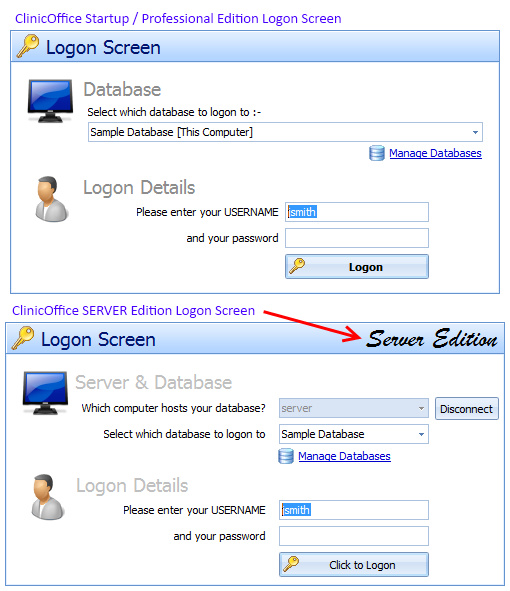
Please can you confirm if you are definitely running the SERVER EDITION?
July 13, 2012 at 11:42 am in reply to: ClinicOffice Server Edition asking for Activation Key? #33049Hi,
Thanks for your post. As you’re using the SERVER Edition of ClinicOffice, the license is held on your SERVER computer, hence there are only two reasons why your computer would be requesting activation :-[1] Your SERVER computer isn’t licenses – which is unlikely as it’s presumably working fine from other computers?
[2] You have accidentally run the “non-server” edition of ClinicOffice, which is most likely the problem. Please do the following :-
– Click your START button
– Click “Programs” (or “All Programs”)
– Locate the “ClinicOffice” group
– Click the “ClinicOffice v4 Server Edition” shortcut (not the “ClinicOffice v4” shortcut)
You may want to copy the “ClinicOffice v4 Server Edition” to your desktop and remove the standard “ClinicOffice v4” icon.Hi – thanks for your post.
The rule definition options are stored as XML in your database and we do see this very occasionally where somehow the XML string gets corrupted or somehow becomes invalid. At one time we thought it might happen if you used XML style ‘
‘ in your message text or perhaps symbols like ‘<' or '>‘, but we’ve never been able to reproduce the problem here even entering those kind of codes/symbols – it’s most odd. Anyway, to fix this please click “TOOLS | ADVANCED DB OPERATION” and then copy and paste the following code replacing ‘My Rule Name’ with the name of the rule in question (make sure you type it exactly correct including the CASE) :-
update pcrule set definition='' where name='My Rule Name';Executing the above statement will clear out the XML definition of the rule and you can then right-click the rule and click EDIT to pop the settings back in.
Hope this helps!
Hi Backman,
Thanks for your post. We do have a number of customers who use Terminal Services/Remote Desktop to access a single installation of ClinicOffice on a server computer from network clients, and it seems to work quite well for them.
There are some benefits. For example, you only have to update one installation of ClinicOffice and if your server is particularly hi-spec (and you don’t have too many users) you might get a performance boost too.
There are downsides however: if your server goes down, everyone loses access. Also, running several instances of ClinicOffice is quite resource-hungry on a server which can affect performance adversely if the server isn’t quite up to the job or if it’s busy running other intensive processes.
On the whole, we don’t usually recommend a TS/RD configuration for ClinicOffice unless you really know what you’re doing (or if you have some dedicated IT support for your network) because in the event of problems or performance issues, it’s unlikely that our helpdesk will be able to assist with your network setup.
Hope this helps!
Thanks for your post.
(a) OK… the error message means that ClinicOffice can’t connect to your email server, so the first thing to check is what does ClinicOffice have set as your email server? To find out please go to the Email Manager, click “Email Settings” (top right) and click “Configure Email Accounts”.
This will bring up the “Email Account Manager” screen – please can you attach a screen shot of that screen?
(b) Please try closing down ClinicOffice and then downloading and running the update direct from our website. You can download it from here :-
https://pioneersoftware.co.uk/co-updates(c) This is because you’re trying to save the backup direct to a network/removable drive which was a problem prior to build 1070. Once you’ve installed the update it should be fine.
Hope this helps!
Hi there – thanks for your post.
(a) the emails keep returning with a fault “Unable to connect to mail server”
Please can you elaborate? Are you using the Email Module? If so, have you correctly setup your POP and SMTP servers in the email accounts screen? On page 92 of your User Guide there’s a section “Email Account Setup” which explains how to enter your email account details into ClinicOffice. Obviously your email account details are not something that we have access to, but more likely will be given to you by your ISP (Internet Service Provider) e.g. BT, Tiscali, TalkTalk, AOL etc.(b) when it asks if I want to upgrade to the next version 1070 instead of 1068 it crashes
When you say “it crashes” – what do you mean? Is there a specific error message that you can tell us about? Can you send a screenshot of the message? How far through the update procedure does it get? 1000’s of users have upgraded successfully to update 1070, so it’s a bit difficult to diagnose what the problem might be from that description.(c) when I try and back up it crashes
Once again… we really can’t help based on that description – please give us more details.(d) when I want to sync with google calendar there is a fault!
Google Sync hasn’t been implemented yet – it will be released in update 1071. There was a mistake made with a release of 1068 which showed the “Google Calendar Sync” option in the right-click menu on the diary screen, however the feature was not implemented and we quickly rectified by re-uploading build 1068. Possibly you downloaded update 1068 in the small window before we noticed the mistake – apologies for the confusion. As mentioned, 1071 will include this feature for users who have purchased the Calendar Sync module.We look forward to receiving more details from you so that we can assist further.
Hi Roelof,
We’ve had a look but are unable to reproduce this problem and nobody else has mentioned this, which leads us to think it might be related to your database. Please can you firstly check that all your computers are running the latest release of ClinicOffice and then run a Database Check operation on your database.
Please let us know if that resolves the problem.
Hi thanks for your post.
This is one of those annoying occasions where it’s proved difficult to please everyone! We had a lot of requests from customers to omit the “knownas” field as it was being included in letter merges and official documents, however since making that change, a number of other customers want it back.
We’ve released a ‘silent’ 1070 update (you can re-download it from here) for both COv4 and COv5 which adds it the knownas back in to some of the name formats. The problematic one seemed to be “Firstname / Lastname” format so we’ve left “knownas” out of that one, but have added a new “name format” type called “Firstname / Lastname Informal” which includes it.
Here’s an updated list of the available name formats :-
Lookup e.g. Smith, John Mr (Jonny) [12345]
Code Lookup e.g. 12345: Smith, John Mr (Jonny)
First/Last e.g. John Smith
Title/First/Last e.g. Mr John Smith
Formal e.g. Mr Smith
Informal e.g. Jonny
Informal First/Last e.g. Jonny Smith
Complete e.g. Mr John Edward Smith (Jonny)As mentioned, if you’ve already updated to 1070, simply re-download and and install the update again from here :-
https://pioneersoftware.co.uk/co-updatesMany thanks!
>> “the error code says its forbidden by the website”
I’m afraid I don’t understand – what website do you mean? A POP mail server isn’t a website at all. Have you tried configuring your email with another desktop email client, like Outlook Express of Windows Live Mail? If you can get it working in those programs then the required settings will be exactly the same in ClinicOffice.
Apart from that suggestion, I think that the only way we can help you is if you can please email us (support@pioneersoftware.co.uk) with your full email account details (i.e. the POP/SMTP server details, your username and your password) and then we will try to configure it here to see if it works and if there is a problem we will be able to trace through and resolve it for you.
Please bear in mind that we have many hundreds of users using the Email Manager (in fact we use it ourselves!) with 100s of different Internet Service Providers (ISPs) so the problem is most likely going to be either the settings that you are entering or a more obscure problem with your particular ISP (DriveHQ).
I hope this helps!
Thank you for your post and for sending images which are helpful.
I have Googled “DriveHQ” and came up with the following web page which includes step-by-step instructions :-
http://www.drivehq.com/Email/Help/doc/email_step.htmLooking at your screen shots it appears that you have enabled SSL in ClinicOffice, whereas the instructions do not mention SSL, so the option should be DISABLED (i.e. unticked).
You have also entered an SMTP port of 26 in ClinicOffice, while the default should be 25 and I can see no mention of DriveHQ using a non-standard port 26.
Please correct both of these mistakes and let us know if it solves the problem – many thanks!
Thanks for your question. The best way to achieve this is to create CHARGES for each Appointment rather than creating a separate invoice for each appointment. You can then create a SINGLE invoice which consolidates all the outstanding charges.
Here are some more detailed instructions :-
Firstly, please make sure that you have specified an “Invoice Recipient” in your patient records. This lets ClinicOffice know that bills/charges for a patient may go to an alternate 3rd party rather than the patient. In your case, you would need to (a) add the care home as a CONTACT in your database and (b) set the “Invoice Recipient” for your patients to the appropriate care home.
To raise a charge on an appointment, simply right-click the appointment in the diary and then click ADD CHARGE. If you have setup an alternate “Invoice Recipient” then ClinicOffice will now ask who is being charged – the patient, or the alternate recipient? Select the alternate recipient (i.e. the care home).
Once you have raised charges for all the appointments, all you need to do is now raise the invoice. Click the drop-down arrow on the FINANCES button and then select RAISE INVOICES. This screen allows you to create a single invoice from all the outstanding charges.
Please refer to page 65 of your COv5 User Guide for more detailed information on this.
I hope this information is helpful – many thanks!
Hi Adminboy – sorry this is not possible. The query engine can only work off an active connection to one database at a time.
Hi Mesologie – this error is caused by a custom script that you’re using.
The error seems to indicate that the script it trying to store a string in the database which is too long. Please can you contact our Help Desk in office hours and we’ll connect in to your computer to take a look? Many thanks!
It’s not quite as simple as just looking up the EDB reference guide I’m afraid. ClinicOffice uses an intermediate SQL language as it has to be compatible with both EDB SQL and PGSQL, so certain functions may not be supported.
There shouldn’t be any leading or trailing spaces using @NAME, but you could try the following :-
TRIM(@NAME:per) as _payernameThe SQL syntax for a comment is to start a line with ‘–‘ (without the quotes). However, due to our extended SQL parsing, this only works if you put the ‘–comment’ at the end of the SQL query…
select x, y, z

from atable

order by x;

-- some comments here
As an alternative, you could use the REPORT NOTES field to make notes about the SQL.
Hi Adminboy,
Thanks for your post. To be honest I’m not sure about the LTRIM and RTRIM SQL commands. Please try substituting that enter line for the following :-
@NAME:per as _payernameThe ‘@NAME’ function is a ClinicOffice extension which calculates the full name based on the name format in your program settings.
Please let us know if this works for you.
Hi Tony,
Sorry – I’m a bit confused by your last post. You can always right-click on any column footer (either the REPORT footer or a GROUP footer) and then select a summary function. Is that what you wanted to do from the outset?
Apologies – I have corrected the SQL in the original post (rather than re-posting it here which would get confusing). Please copy/paste it again and let us know if it works now.
Thanks!
Hi Roelof – thanks for your post.
ClinicOffice only uses the POP & SMTP protocols – IMAP is not supported. This is a deliberate design decision because IMAP is an ‘online-only’ protocol which only allows you to work with emails residing on the mail server and doesn’t allow you to download them and work with them offline. This restricts the functionality of what you can do with your email messages.
The ClinicOffice Email Module has been designed to allow teamwork collaberation over emails, as well as email sorting and distribution (to different staff members), flagging, pinning, internal messaging etc. None of these features would be possible without first downloading emails into the database, which IMAP does not allow.
I hope this makes sense and helps to clarify.
Hi ttaylor,
Thanks for your post. We recommend taking a COPY of the report and making the following changes to your copy. This will preserve the original report. (You can of course rename the copy to something more descriptive.)
Firstly, there isn’t actually an “invoice category” – there is an “appointment category” which comes over from the appointment on which the invoice is based. Please update the SQL SOURCE to the following :-
select


invline.description,

cast(sum(invline.quantity) as float) as qty,

sum(invline.net) as nettotal,

sum(invline.tax) as taxtotal,

sum(invline.total) as total,


itemcat.id as itemcat_id,

itemcat.name as itemcategory,

inv.clinic_id, clinic.name as _clinicname,

inv.apptype_id, apptype.name as _appointment_type


from invline

inner join inv on (inv.id=invline.inv_id)

inner join clinic on (inv.clinic_id=clinic.id)

left join item on (invline.item_id=item.id)

left join itemcat on (item.itemcat_id=itemcat.id)

left join apptype on (inv.apptype_id=apptype.id)


group by invline.description, itemcat.name, itemcat.id, clinic.name, inv.clinic_id, inv.apptype_id, apptype.name


order by invline.description, apptype.name
Now you simply need to add an extra level of grouping on the “Appointment Type” column – you can do this by right clicking on the column header and select GROUP BY.
Please let us know how you get on with this – many thanks!
When you “EMAIL AS” with an attachment, you must first save the attachment to a location on your hard disk so that your default email program can attach the file to a new email.
Please try saving the file (e.g. to your desktop) and then you should see a new blank email pops up with the file attached to it. You can then delete the file after sending the email.
Hope this helps!
Thanks for the explanation. I think the problem here is that Outlook doesn’t support the notion of “Cancelled” appointments being hidden.
The only way around this would be to actually DELETE cancelled appointments from Outlook – however if we did that, then if someone changed the sync priority (to give priority to Outlook) and then you performer another sync, it would actually DELETE the appointment records out of ClinicOffice because they had been deleted in Outlook.
As you can see, there is no simple solution. The way that ClinicOffice works is that it if “Include cancelled appointments” is not ticked, then ClinicOffice simply IGNORES (i.e. excludes) cancelled appointments from the sync operation.
I’m not sure if there’s a better way to do it?
@Steven Crook (salisburyfes)
Thanks for your post Steven – I’ve emailed you separately with some instructions. From the license server end, the upgrade appears to have gone through fine, so I’m not sure what the problem is. If you follow the instructions I’ve emailed then you should be fine.@Tony Taylor (ttaylor)
>> Is there any advice on when we should plan to make this upgrade?
If you have a lot of computers to go round upgrading, then it would be a good idea to do it when there’s minimum disruption to your users e.g. after work hours or perhaps on a weekend. Otherwise, there’s no rush from our side of things – you’re welcome to upgrade whenever you like.>> So apart from any “bug fixes” does the focus now switch to v5?
Very good question. Active development (e.g. new/enhanced features) will now target v5, however v4 will still receive regular updates and bug fixes. Both versions run off the same code-base, so bug fixes to the core program will benefit both versions and for the time-being, we will continue releasing COv4 updates at the same time as COv5 updates.I hope this answers the question adequately – many thanks!
Hi Dee – thanks for explaining in more detail. We’ve spotted what might cause this problem and we’ve issued a “HOTFIX” for it in the latest update (build 1068).
All you need to do is re-download and install the update again which you can do from here :-
https://pioneersoftware.co.uk/co-updatesApologies for any inconvenience!
February 2, 2012 at 9:42 am in reply to: FAQ 108: Can I put my ClinicOffice database on a NAS drive? #32889The problem is caused by the lock-file mechanism used in the database engine. In order for it to work correctly it needs to know where it is stored, and each client needs to access it via the same path.
If you were moving it on to a different PC (rather than a NAS drive) then when you run ClinicOffice on that PC, it would detect the incorrect internal path and correct it for you. The problem is that when you create a database on a PC, then move it to a NAS drive (thus invalidating the internal path) then it’s not possible to update the internal path from the NAS drive which is a “dumb” device.
To further complicate things, COv5 (just released) now uses a mini client/server database engine for the Startup/Professional editions. This will make it impossible to host a database on a NAS device.
Perhaps a better method would be to run ClinicOffice from a PC and then have a backup routine to regularly copy the database to the NAS device?
We’re updating the main FAQ article above to reflect this.
Hi Roelof,
Please see this FAQ which will help you to restore your form layout :-
https://pioneersoftware.co.uk/forums/topic/faq-330-how-do-i-restore-a-form-layout
Many thanks!
Hi Dee – the “Sample Case History” form is provided as part of the Sample Database.
We tend to recommend creating your own forms from scratch, but if you want to use the Sample Case History form then you need to log on to the Sample Database (username: jsmith, no password), go to the Form Designer and EXPORT the Sample Case History form (this allows you to save the form as a file).
Then log back on to your database, go to the Form Designer and choose to IMPORT the previously exported file.
Hope this helps!
Thanks for your question. On page 70/71 of your User Guide (which is also available in PDF format by clicking the HELP tab, then clicking USER GUIDE), it says :-
Any column in the grid can be sorted alphabetically (or numerically) in ascending or descending order. To sort a column in ascending order, simply click the column header…
The same can be achieved by right-clicking on the column header and selecting Sort Ascending or Sort Descending from the menu.
You can sort on multiple columns by selecting the first sort column (as described above) and then holding the SHIFT key (on the keyboard) whilst clicking on another column header. This will add a secondary sort on the second column you have chosen. You can then add a third sort as well by clicking on a third column while still holding the SHIFT key. You may sort by as many column headers as you like by using this method.
I hope this helps to answer your question – please let us know if you need any further help.
Apologies for the delay in replying. We’ve tested this with several different databases (both EDB and PostgreSQL) and no matter how many times we synchronise back-and-forth we can’t reproduce this problem – it works as expected every time.
If your problem persists please upload BOTH your database and your Outlook PST file to our server by following the instructions here :-
https://pioneersoftware.co.uk/forums/topic/faq-301-how-do-i-upload-my-database-to-your-ftp-server
…and please provide us with step-by-step instructions on how to reproduce the problem including exactly which appointments you are seeing this behaviour with. Many thanks!
Thanks for explaining what you require. We have modified the original “Invoiced Items & Services by Patient” report by removing all agreggation and adding in the “date/time” and “invoicenum” fields.
Please try the attached report and let us know if it’s what you are after.
Instructions for importing a report can be found here :-
https://pioneersoftware.co.uk/forums/topic/how-do-i-import-a-report-file-into-my-database
-
-
AuthorPosts
